
Eglantine Emulator
v0.1.0-rc1
Eglantine Emulator is a free and open-source Nintendo Switch 2 emulator designed to bring supported Switch 2 games to compatible Windows, Linux, and Apple Silicon macOS devices. Based on the work of Eden, Yuzu, and Sudachi, it is an experimental project focused on developing Nintendo Switch 2 emulation for desktop computers.
With Eglantine Emulator, users can explore supported games, configure controls, adjust available graphics settings, and experience ongoing improvements through development releases. Although the project is still experimental, it continues to develop compatibility with Nintendo Switch 2 titles.
Whether you are new to emulation or already familiar with gaming emulators, this guide will help you understand Eglantine Emulator, explore its key features, check supported platforms, and learn how to download and install it on your computer.
What Is Eglantine Emulator?

Eglantine Emulator is a software application designed to let users play games from supported gaming systems on compatible devices.
It works by creating an environment that allows your device to run games designed for another platform.
This makes it easier for gamers to explore different gaming experiences without always needing the original gaming hardware.
Eglantine Emulator is designed for users who want a flexible and convenient way to enjoy supported games. Depending on its available features and device compatibility, users may be able to adjust settings, customize controls, and improve their overall gaming experience.
Before using it, make sure to check the supported devices, game compatibility, and official installation instructions.
Key Features of Eglantine Emulator
Easy-to-Use Interface
Eglantine Emulator is designed to be simple to use. Its interface helps users easily find different options, open settings, and manage their gaming experience without dealing with complicated steps.
Game Compatibility
The emulator is intended to run supported games on compatible devices. Users can check game compatibility and enjoy their favourite titles without needing the original gaming system.
Customizable Controls
Players can adjust the available control settings according to their preferences. This makes it easier to play games comfortably and choose controls that suit their playing style.
Graphics Customization
Graphics settings allow users to adjust available visual options according to their device. This helps them find a suitable balance between game appearance and performance.
Performance Optimization
The available performance settings can help users configure the emulator based on their device’s capabilities. The right settings may provide a smoother and more enjoyable gaming experience.
Audio Support
Audio support helps deliver a complete gaming experience by allowing players to enjoy in-game sounds, background music, and other audio effects while playing supported games.
Save and Load Game Progress
Save and load options, if supported, allow players to save their progress and return to the same point later. This is useful for games that take time to complete.
External Controller Support
Compatible controller support, when available, allows users to play with a physical gamepad instead of relying only on keyboard or touchscreen controls.
Regular Updates
Updates released by the developers may bring useful improvements, fix existing problems, and introduce new features. Keeping the emulator updated can help users get the latest available version.
Flexible Configuration Options
Users can explore different emulator settings and adjust them according to their needs. This makes it easier to create a comfortable gaming setup based on personal preferences and device capabilities.
How to Download and Install Eglantine Emulator
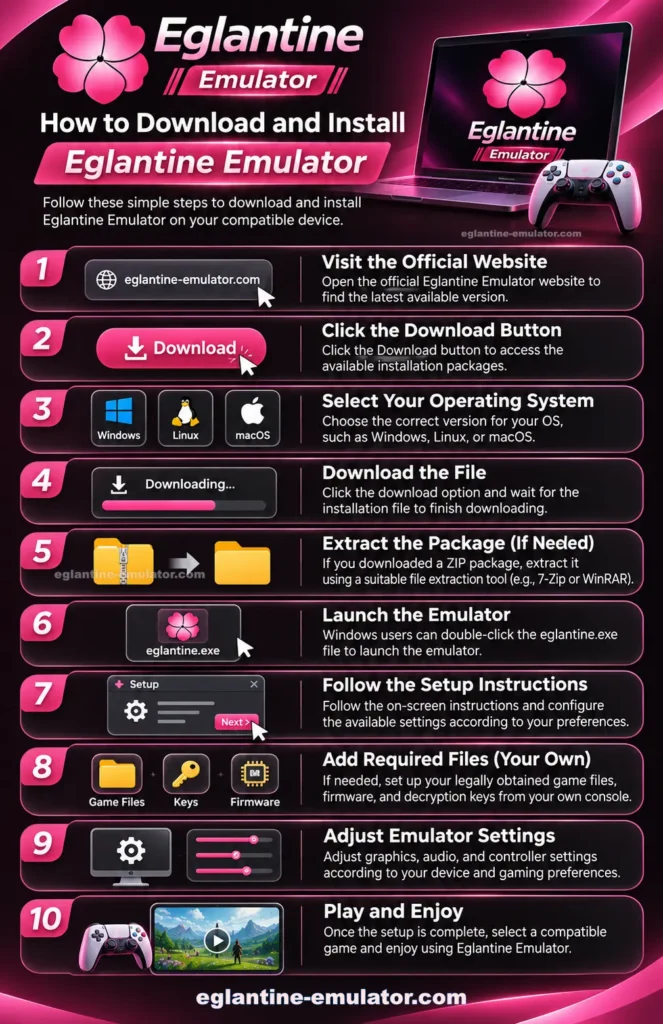
Follow these simple steps to download and install Eglantine Emulator on your compatible device.
- Open the official Eglantine Emulator website to find the latest available version.
- Click the Download button to access the available installation packages.
- Select the correct version according to your operating system, such as Windows, Linux, or macOS.
- Click the download option and wait for the installation file to finish downloading.
- If you downloaded a ZIP package, extract it using a suitable file extraction tool.
- Windows users can double-click the eglantine.exe file to launch the emulator.
- Follow the on-screen instructions and configure the available settings according to your preferences.
- If needed, set up your legally obtained game files, firmware, and decryption keys from your own console.
- Adjust graphics, audio, and controller settings according to your device and gaming preferences.
- Once the setup is complete, select a compatible game and enjoy using Eglantine Emulator.
Important: Eglantine is still experimental, and its official verified downloads currently support Windows, Linux, and Apple Silicon macOS. There is no official Android APK or iOS version in the verified release.
FAQs
What is Eglantine Emulator?
Eglantine is a free, open-source Nintendo Switch 2 emulator that allows users to run compatible games on supported devices.
Is Eglantine Emulator free to download?
Yes, Eglantine is free and open-source software. Users can download its available builds without purchasing a paid version.
Which platforms support Eglantine Emulator?
Currently, Eglantine is available on Windows, Linux, and macOS it will soon be available on Android as well.
Can Eglantine Emulator run Nintendo Switch 2 games?
Yes, it can run some Nintendo Switch 2 games, but compatibility is still experimental and varies between games.
Can I play Mario Kart World on Eglantine Emulator?
Yes, the official project reports that Mario Kart World can run at decent or full speed, depending on your hardware and configuration.
Does Eglantine Emulator support Splatoon Raiders?
Yes, the project reports support for Splatoon Raiders, although performance can vary depending on your device.
Is Eglantine Emulator available for Android?
Yes, Android APK builds are available for compatible ARM64 devices running Android 13 or newer.
Is Eglantine Emulator safe to download?
Download it from the project’s official GitHub repository. Avoid unknown websites, modified installers, and files that ask you to disable antivirus protection.
Is Eglantine Emulator still under development?
Yes, Eglantine is an experimental project that continues to receive development updates, improvements, and bug fixes.
Can I use a controller with Eglantine Emulator?
Yes, the emulator includes controller configuration options that allow users to set up compatible controllers.
Final Conclusion
Eglantine Emulator is a promising open-source project for users interested in Nintendo Switch 2 emulation on Windows, Linux, and Apple Silicon macOS. It offers an opportunity to explore supported games, configure available settings, and follow the ongoing development of Switch 2 emulation.
As the emulator is still experimental, game compatibility, performance, and stability may vary depending on your hardware and the version you use. If you want to try it, visit the official GitHub repository to check the latest releases, download files, and installation instructions. Always use legally obtained games, firmware, and keys from your own console.
Eglantine Emulator
Eglantine Emulator is a free and open-source Nintendo Switch 2 emulator for Windows, Linux, and macOS. Explore features, downloads, compatibility, and setup guides.
Price: 0.0
Price Currency: USD
Operating System: Windows, Mac, Linux
Application Category: Game
4.9